Welcome, Guest
Username: Password: Remember me
Lab CT Version, news, test results, new features request and suggestions

TOPIC:

CT LAB ver 9.00 1 month 2 weeks ago #19645

  • Sternas Stefanos
  • Sternas Stefanos's Avatar Topic Author
  • Offline
  • Moderator
  • Moderator
  • Ex Pilot, M.Sc, Ph.D
  • Posts: 4636
  • Thank you received: 1144
Thanks Sir
We will check and update pl_ORCA with your code. 
PilotLogic Architect and Core Programmer

Please Log in or Create an account to join the conversation.

CT LAB ver 9.00 1 month 1 week ago #19646

  • Vbxler
  • Vbxler's Avatar
  • Offline
  • Junior Member
  • Junior Member
  • Posts: 84
  • Thank you received: 5
Hello Mr. Sternas,
I would like to ask you whether its possible to integrate new controls?

forum.lazarus.freepascal.org/index.php/topic,74355.0.html
github.com/ACTom/TyControls

These controls have a modern look, which would improve the appearance of the GUI.

Please Log in or Create an account to join the conversation.

CT LAB ver 9.00 1 month 1 week ago #19647

  • Sternas Stefanos
  • Sternas Stefanos's Avatar Topic Author
  • Offline
  • Moderator
  • Moderator
  • Ex Pilot, M.Sc, Ph.D
  • Posts: 4636
  • Thank you received: 1144
Thanks Sir

From CT 9.00 (Current) you can find
pl_BGRATyControls

It's TyControls pkg ....

----

PS: LAB CT 9.10 (Unreleased)
has many new pkgs until now :

   -lz_Metafile         
   -pl_MathParserGraph      
   -pl_SedaiAudio    
   -pl_TlsLib4Pascal            
   -pl_TlsLib4PascalFclNet      
   -pl_TlsLib4PascalIndy      
   -pl_TlsLib4PascalmORMot     
   -pl_TlsLib4PascalSynapse  
   -pl_XelAudio            
   -pl_XelComponents       
   -pl_XelCompress          


PilotLogic Architect and Core Programmer
The following user(s) said Thank You: LuZZZZi

Please Log in or Create an account to join the conversation.

CT LAB ver 9.00 1 month 1 week ago #19648

  • Vbxler
  • Vbxler's Avatar
  • Offline
  • Junior Member
  • Junior Member
  • Posts: 84
  • Thank you received: 5
Thank you for your support!

Please Log in or Create an account to join the conversation.

CT LAB ver 9.00 1 month 1 week ago #19649

  • choki
  • choki's Avatar
  • Away
  • Junior Member
  • Junior Member
  • Posts: 72
  • Thank you received: 2

Hello,
I installed this new version on Fedora 44/KDE and haven't encountered any issues.
Great job :))
However, while using it, I’ve noticed a few issues:
- On non-QWERTY keyboards, Ctrl + Shift + N works, but Ctrl + N does not.
- I’m having trouble with copy/paste. CT refuses to paste text that was previously copied, even though I can paste it in Kate, for example. That’s very strange. 
edit: I tested the copy-and-paste function again. Everything works perfectly when CT starts up. But at some point (I don't know when yet), it stops working.
To be continued...
- Is it possible to change the display of the context-sensitive help? In CT, it’s hard to read (see the attached images).
- Is it possible to increase the size of the component icons in the component palette?
Thanks for this excellent version.

Otherwise, I’m running Fedora 44/KDE.
CT version 9 revision 009000
i9/32GB


It's Wayland... Sir


Copy paste problem is not wayland, its Old bug when using QT widget (qt5/qt6), but never happen in GTK2,
please fix this annoying copy paste problem...

BTW, still using X11

thank
The following user(s) said Thank You: atlandev.ct

Please Log in or Create an account to join the conversation.

CT LAB ver 9.00 1 month 1 week ago #19652

  • Matis A.
  • Matis A.'s Avatar
  • Away
  • Moderator
  • Moderator
  • Posts: 1431
  • Thank you received: 229
Thanks Sir
We will try to fix this
 
PilotLogic Core Programmer
The following user(s) said Thank You: atlandev.ct

Please Log in or Create an account to join the conversation.

CT LAB ver 9.00 1 month 1 week ago #19654

  • LuZZZZi
  • LuZZZZi's Avatar
  • Offline
  • Junior Member
  • Junior Member
  • Posts: 124
  • Thank you received: 1
Sorry, nonsense. All works ok.

Please Log in or Create an account to join the conversation.

Last edit: by LuZZZZi.

Cannot copy text from object inspector 1 day 3 minutes ago #19675

  • choki
  • choki's Avatar
  • Away
  • Junior Member
  • Junior Member
  • Posts: 72
  • Thank you received: 2
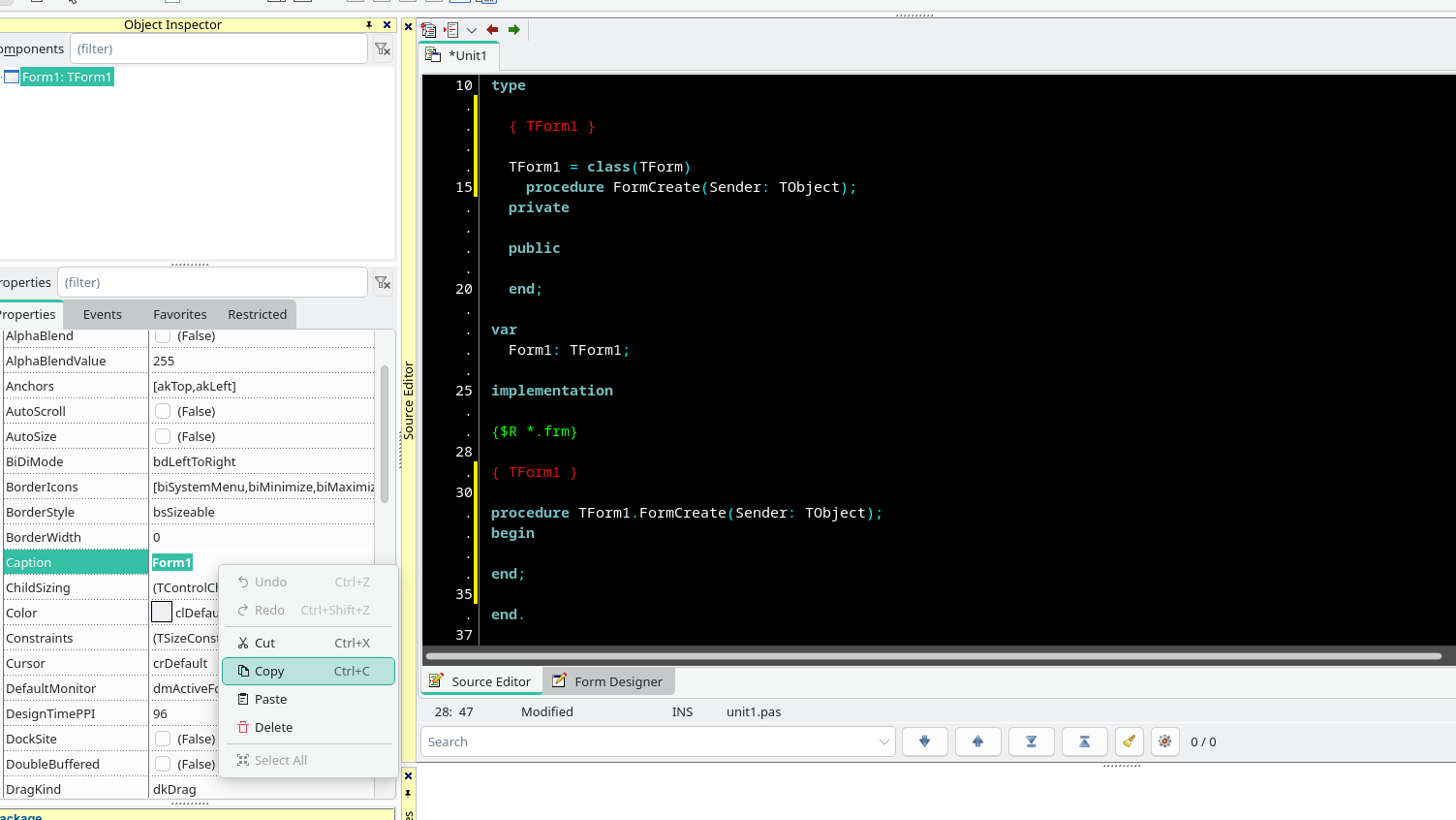
I'm trying to copy the color property value from the ObjectInspector and paste it into the editor, but it won't paste. Even though it works perfectly fine in other text editors. The same issue also happens with other properties like captions.

QT6
Machine: manjaro.

Reproduce:
  1. new project
  2. change form color to custom color ex:#7c6158 from color chooser/selector
  3. double click color value to copy, when couble click the color value change automatically to clBlack
  4. after that, nothing cannot copy from object inspector to editor, including just copy caption "Form1"

Please Log in or Create an account to join the conversation.

Last edit: by choki.

Cannot copy text from object inspector 53 minutes ago #19678

  • Matis A.
  • Matis A.'s Avatar
  • Away
  • Moderator
  • Moderator
  • Posts: 1431
  • Thank you received: 229
Thanks Sir
Yes, this is a problem.
We will try to fix it.
PilotLogic Core Programmer

Please Log in or Create an account to join the conversation.

Last edit: by Matis A..